
If you’re responsible for the AI budget, the main issue isn’t usually the overall amount. The real challenge is that you only see the total once a month, with no breakdown by workflow. Costs can climb quickly when prompts hit new edge cases, especially in processes that handle lots of records and documents. The good news is there are proven ways to reduce unnecessary token use without changing what your process does, and you can make spending clear before the invoice arrives.
Most finance teams don’t realize how big this issue is. According to Ramp’s AI Index, the median company spends $12 per employee each month on AI, while the top 1% spend as much as $7,500 per employee per month. These amounts are significant, and the difference between just using AI and using it efficiently is now clear on the bill.
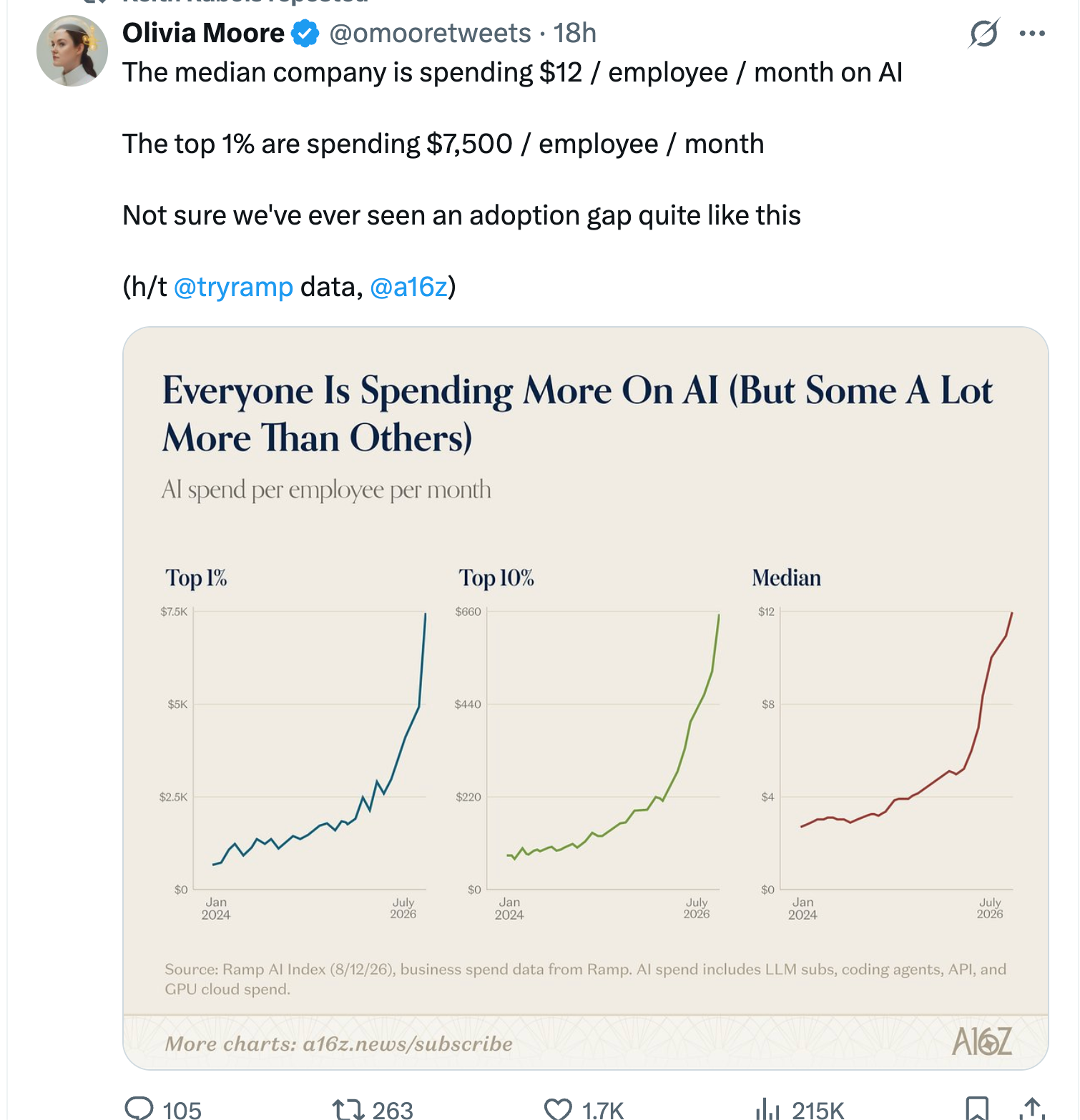
Source: Ramp AI Index (8/12/26), business spend data from Ramp. AI spend includes LLM subscriptions, coding agents, API, and GPU cloud spend. Chart via a16z.
Where token spend spikes
- Repeating the same context over and over adds up. If your process sends the same instructions, reference documents, or background data every time, you’re paying for each use. Prompt caching solves this, and Anthropic offers up to a 90% discount on cached input.
- Using a larger model than necessary can waste money. Tasks like classification, extraction, and formatting usually work just as well with a smaller, cheaper model. Reserve the most advanced model for steps that truly need complex judgment.
- Paying full price for non-urgent work isn’t necessary. If a task doesn’t need an immediate answer, use a batch endpoint instead. Anthropic’s Message Batches API costs half as much as standard pricing, which is the biggest discount you can get without changing your prompt.
- Unlimited prompt retries can quickly waste tokens. If a prompt keeps retrying after a failure or checks its own work in a loop, you can use up tokens with no results. Every automated process should have a strict retry limit and a clear endpoint.
The fix: skills with built-in safeguards
A skill is a focused set of instructions designed for a specific job and task. Using skills instead of one general-purpose prompt lets you choose the best model for each step, use cheaper models for simple tasks, reuse information instead of resending it, and set clear stopping points. This setup also lets you see exactly how each task uses tokens, so you don’t have to guess.
Instead of loading a big prompt that tries to handle everything, load only the specific skill needed for the task. This way, only the important instructions run, making the process simpler and using fewer tokens.
What to ask before approving a workflow
- Are you sending the same information more than once during a single run? If so, you’re likely wasting tokens.
- Does each step use the model that best fits the job, or is everything running on the same, possibly more expensive, model?
- Is there a clear endpoint, or could the process keep running in a loop?
- Do you know the cost of each run, or do you only see the total at the end of the month?
- Can you link spending to a team, workflow, or customer? If not, it’s hard to tell which processes are expensive and which are valuable.
What this looks like on a real run
Here’s an example from our own experience: the skill that writes the daily roundup for uristocrat.com. On 2026-08-20, it ran for about 12 minutes and produced a finished post.
| Tokens | |
|---|---|
| Fresh input | 172 |
| Read from cache | 10,200,154 |
| Written to cache | 424,390 |
| Output | 67,402 |
In this run, 96% of the data was served from cache. Only 0.0016% was fresh input. The skill read about ten million tokens of context to write sixty-seven thousand, and the cost for reading was almost nothing.
This example sums it up: Anthropic charges about one-tenth the price for cached input compared to fresh input. Sending the same context without caching would have cost about ten times more and produced the same result.
Method: a single run of our internal daily-roundup skill on 2026-08-20, model claude-opus-5, 749 seconds, no connectors and no nested skill calls. Token counts are recorded by our own run tracker. One run is an illustration, not a benchmark.
Skills load only when needed
Only the name and a short description of each skill stay in context all the time, costing just a few tokens each. The full instructions load only when needed. This way, you can have 50 skills ready and only pay for 50 short lines, not 50 long documents. Keeping most instructions out of context until needed helps you see exactly how each task affects your spending.
Give the model a path
Most wasted tokens aren’t from the instructions themselves, but from searching, guessing, and redoing work. A skill that simply says “read this file, then write to that path” removes the need for searching. In the example above, there were 172 tokens of fresh instruction compared to ten million tokens of context. What you write costs very little; what the model has to keep in context is what really adds up.
Skills can delegate to subagents
A skill can create an agent to handle searches or lookups, keeping the messy steps out of your main context. This way, you get a clear answer instead of a raw data dump in your conversation.
Good skills use progressive disclosure
Keep the main instructions for each skill short and link to reference files only for rare or special cases. The reference loads only when needed, which keeps regular runs inexpensive.
There’s a real trade-off here. Every skill description adds a permanent cost to your context, so 20 skills with long descriptions cost more than 5 with short, focused ones. Keep descriptions tight, review what you’re actually using regularly, and delete what you don’t need. The rule underneath all of this: keep only what’s useful in context, so your spending stays visible instead of hidden.
Track spend per process, not per invoice
Instead of waiting for the bill to find out what AI cost you, track the cost of each process as it runs, the same way you’d track any other line item. Use your AI platform’s built-in usage dashboard, or log token counts straight from API responses. Our own Skills and Agents Run Tracker, along with tools like LangChain’s token trackers and OpenAI’s usage dashboards, can summarize token usage per task, so a cost spike gets caught early rather than showing up as a surprise.
You don’t need a new tool or to switch platforms for this. You just need to break the work into small enough steps so you can see the cost of each one.
Check out the skills catalog to see how existing skills are scoped and priced, or read up on what an agent is and does if you’re deciding whether a task needs one.